Casos de uso
A young man with spiked platinum blonde hair wearing a purple and charcoal tacti
Conservar personajes
Antes Después A narrow, winding dirt path disappears into a dense autumn forest during the gol
Conservar personajes
Antes Después The blonde woman from the character still is seated on a plush, oversized living
Conservar personajes
Antes Después
Cómo usar Fondo de personaje
- 1
Sube la imagen del personaje
Sube un PNG o JPG del personaje dibujado. Es la referencia visual para mantener rostro, pose y ropa.
- 2
Elige conservar o quitar personajes
Elige si quieres conservar a los personajes en la imagen o generar un fondo vacío sin personas.
- 3
Elige estilo y modelo y genera
Genera una indicación o escribe la tuya, elige estilo, modelo y proporción y pulsa Generar para crear el fondo nuevo.
¿Qué es Fondo de personaje?
The job
Standing portraits often sit on a blank fill. This page swaps the background while keeping the same cast and art style, so the scene can match the rest of your chapter.
How it works
- Upload a PNG or JPG still. This is the visual reference.
- Choose whether the result should keep characters or be an empty environment plate.
- Click Generate prompt (or write your own), pick art style, model, and image size, then generate.
- Logged-in users get a daily free quota; extra runs use credits.
Where it fits in the workflow
Use this tool when the character is already drawn and you only need the scene. For full pages, open the chapter in Create so the new background stays locked to the same cast and story.
Honest limits
AI still misses faces, outfits, and panel continuity. If the output drifts, regenerate or edit inside the chapter instead of stacking disconnected images.
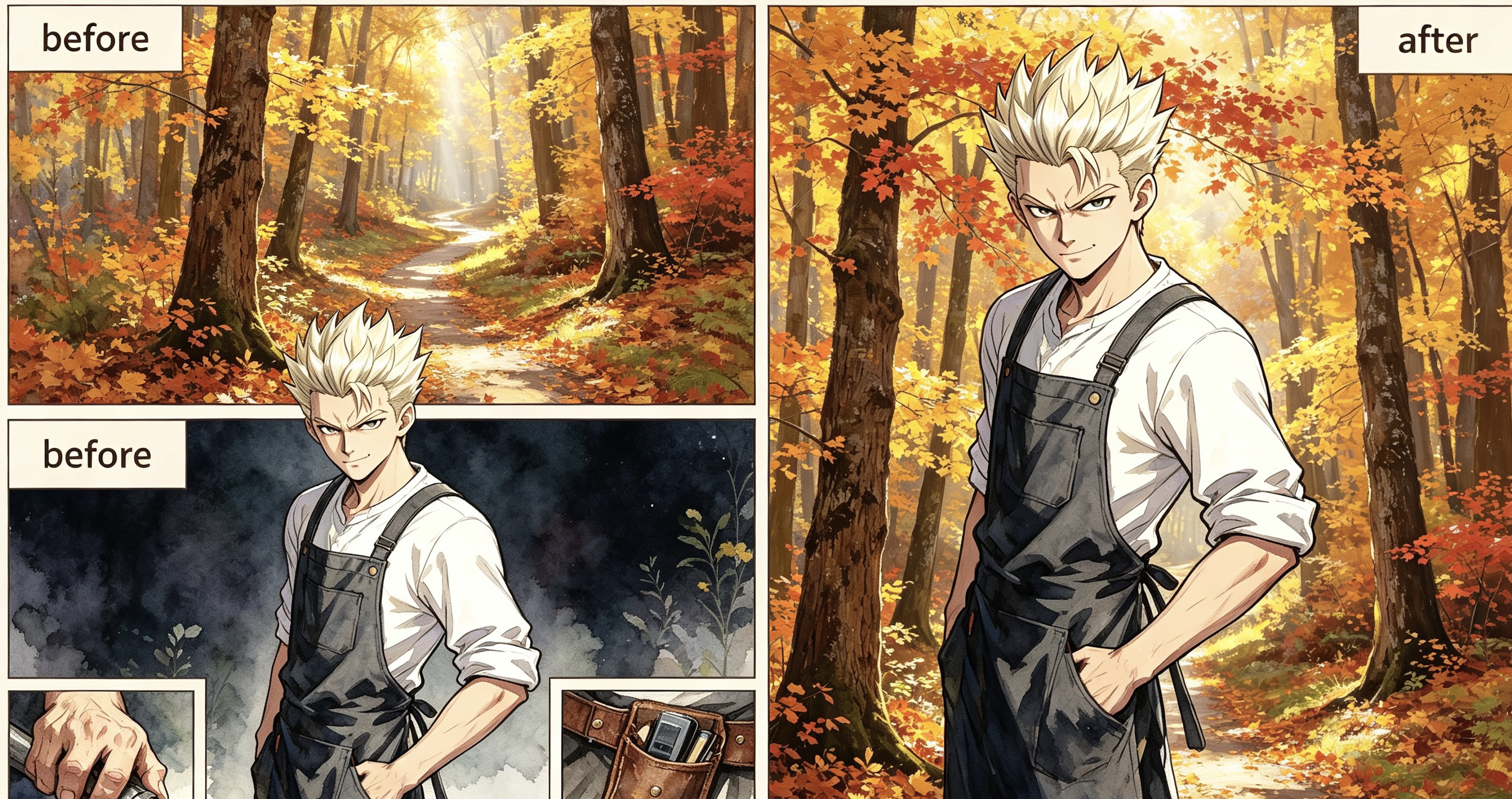
Example: Before & After
Background prompt:
A young man with spiked platinum blonde hair wearing a purple and charcoal tactical jacket stands in the center of a dense autumn forest. The environment is filled with towering maple trees sporting vibrant orange, gold, and amber leaves that create a glowing canopy overhead. A narrow, winding dirt path disappears into the soft golden mist of the background, heavily carpeted in fallen red and yellow foliage. Bright, diffused afternoon sunlight pierces through the vertical tree trunks, creating long, soft shadows and shimmering highlights across the textured bark. The air is clear and still, emphasizing the rich, warm color palette of the woods. The man remains exactly as he appears, his confident pose unchanged amidst the vast scale of the sun-drenched, seasonal wilderness.
Tips for better results
- Name the location, time of day, weather, and a few landmark objects.
- If you keep characters, say so and keep the prompt focused on the environment.
- If you want an empty plate, the model is instructed not to draw people.
- 9:16 is the default vertical panel frame; switch to 16:9 for a wide establishing shot.
Why creators use it
This page is a free AI character-background tool that reuses the same styles and models as Tab Story portraits, so the scene can match the cast.
Preguntas frecuentes
¿El personaje permanece en la imagen?
Sí, si activas «con personajes». El modelo debe conservar rostro, pose y ropa y sustituir solo el entorno. Desactívalo para generar un fondo sin personas.
¿Qué estilos y modelos puedo usar?
Los mismos estilos de cómic y modelos de dibujo que en la herramienta de retratos, incluidos los estilos del sistema y los personalizados.
¿Es gratis?
Cada cuenta de Tab Story con sesión iniciada tiene 20 indicaciones y 1 generación de imagen gratuitas al día. Las adicionales cuestan 5 créditos por indicación y 20 por imagen.
¿Cuándo debo usar la pantalla de creación?
Si necesitas una página completa o mantener el fondo ligado a los mismos personajes y la historia, abre el capítulo en la pantalla de creación para conservar el contexto.
¿Qué hago si el resultado se aleja de la referencia?
La IA puede fallar en rostros, ropa o continuidad entre viñetas. Regenera o edita dentro del capítulo en lugar de acumular imágenes sin relación.
¿Sirve para planos generales panorámicos?
Sí. Cambia a 16:9 para un plano panorámico o mantén 9:16 para una viñeta vertical.
Herramientas relacionadas
Guías
¿Quieres mantener el fondo ligado al capítulo?
Abre el capítulo en la pantalla de creación para que la nueva escena siga ligada a los mismos personajes y la historia en todas las páginas.
Crear con Tab Story