How to Use AI Comic Tools to Create a Retro-Futuristic Comic Like RoboCop
The dystopian chrome and decaying urban sprawl of RoboCop are etched into our collective memory, not just from film but from the gritty comic book aesthetics of its era. For modern creators, capturing that specific blend of analog texture and futuristic dread is a unique challenge. Today's AI comic tools offer unprecedented power for visual storytelling, but their default outputs often feel too clean, too digital. This guide provides a concrete workflow for leveraging AI not as a replacement for artistry, but as a collaborator to efficiently produce comics that feel authentically ripped from the pages of a 1987 newsstand.
Executive Summary: Key Takeaways
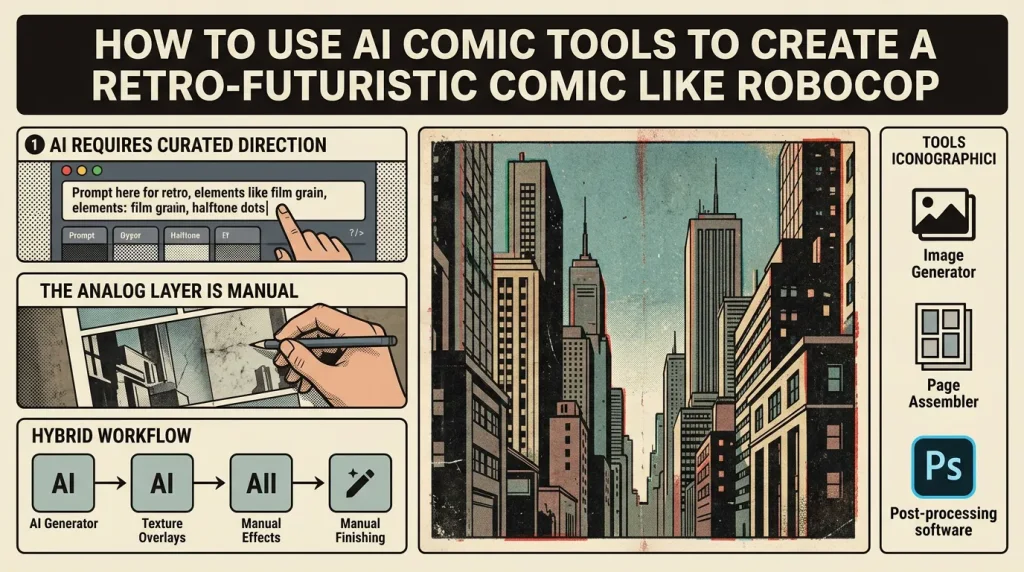
- AI Requires Curated Direction: To avoid a generic, sterile look, you must deconstruct the vintage aesthetic into specific, promptable elements like film grain, dot screens, and muted color palettes.
- The "Analog" Layer is Manual: Authenticity comes from post-processing. Combining AI-generated panels with manual texturing, aging effects, and traditional lettering is non-negotiable.
- A Hybrid Workflow is Key: A efficient pipeline exists: use AI for rapid asset generation and layout ideation, then apply deliberate manual finishing for a cohesive retro-futuristic vibe.
- Tools are Means, Not Ends: The goal isn't to find a single "80s filter," but to assemble a toolbox—from image generators to page assemblers—that fits into a creator-driven process.
Deconstructing the Blueprint: The RoboCop Era Aesthetic
Before prompting a single AI, we must understand our target. A recent analysis of comic books seen in RoboCop (1987) offers a perfect artifact. These background props weren't set dressing; they were authentic products of the time, embodying the visual language we aim to recreate.
The aesthetic is defined by physical limitations becoming style:
- Printing Artifacts: Visible halftone dots (benday dots), slight misregistration of colors, and ink bleed.
- Paper & Color: Pulpy, off-white paper tones and a limited, often muted color palette due to CMYK printing costs, favoring stark contrasts and heavy shadows.
- Line Work: Bold, hand-inked lines with varying weight, not the uniform vectors of digital art.
- Texturing: A tangible grain, from the film stock used in photostat cameras to the texture of the paper itself.
This is our blueprint. The goal of using AI is to generate base compositions that can then be degraded and authenticated with these characteristics.
The AI Toolbox for Analog Emulation
Your toolkit should address different stages: concept, panel generation, assembly, and finishing. Crucially, you must select and prompt tools with the deconstructed aesthetic in mind.
1. Image Generation for Panels & Characters:
- Midjourney / DALL-E 3 / Stable Diffusion: These are your workhorses. The key is in the prompt engineering. Append terms like
halftone pattern,screen print texture,1980s comic book art,inked by Bernie Wrightson,worn comic book cover,film grain,low saturation,cyan and magenta color cast,misaligned CMYKto steer results away from digital polish. - Example Prompt:
"cyberpunk police officer in rain-slicked dystopian alley, 1980s comic book panel, heavy ink lines, halftone shadows, muted neon signs, film grain, gritty texture --ar 2:3"
2. AI-Assisted Comic Assembly & Workflow:
- TabStory (tabstory.net): This tool is uniquely positioned for this hybrid workflow. Its strength lies in converting a written story or script into a structured comic page layout with AI-generated visuals. For a retro project, use it in the ideation and blocking phase. Input your RoboCop-inspired script, let TabStory generate initial panel sequences and compositions, then export those panels as individual images. This gives you a solid narrative layout to then take into dedicated image generators for style-specific rendering and, crucially, into manual post-processing software for adding analog textures, custom lettering, and color corrections. Its one-click conversion is a powerful starting engine for a style that requires a finishing hand.
- Traditional Layout Software (Clip Studio Paint, Photoshop): Essential for the manual post-processing stage. Use these to composite your final AI-generated assets, add physical texture overlays, apply gradient maps for vintage color, and hand-draw elements like motion lines or impact flashes that AI often renders too generically.
3. Lettering & Sound Effects:
AI for typography often falls flat for period accuracy. Use AI image generators to create texture samples (e.g., "crumpled paper texture scan", "ink blot on newsprint") but rely on manual placement. Use fonts like Blambot's vintage comic selections or public domain wood type fonts. Manually warp and distress the text to integrate it with the page.
The Hybrid Workflow: Step-by-Step Guide
This process merges AI speed with manual control for authentic results.
Step 1: Script & Thumbnail with Thematic Guardrails.
Write your scene. As you thumbnail, think in terms of the era: dramatic, often static compositions, heavy shadows, and dense panels. Use a tool like TabStory to quickly visualize page flow from your script.
Step 2: AI Panel Generation with Strategic Prompting.
Generate your key panels in your chosen image AI. Generate elements separately where possible: a character, a background, a vehicle. This gives you more control in compositing. Upscale the outputs, but avoid AI upscalers that oversharpen; opt for ones that preserve or add grain.
Step 3: The Analog Post-Processing Layer (Where the Magic Happens).
This is the critical, manual phase.
- Composite & Color Grade: Assemble your elements in Photoshop or CSP. Apply a Curves adjustment to crush blacks slightly and reduce dynamic range. Use a Gradient Map with a muted cyan, magenta, black, and yellow to simulate vintage print color.
- Apply Textures: Overlay high-resolution scans of real paper, grunge, and halftone patterns. Set blend modes to
Overlay,Soft Light, orMultiplyat low opacity (10-30%). - Add Printing Artifacts: Create a slight chromatic aberration effect (misaligned color channels). Add a layer of noise (
MonochromaticandGaussian). - Manual Lettering: Add your dialogue and SFX in your chosen vintage font. Warp text balloons slightly. Add a subtle stroke and drop shadow that mimics ink bleed.
Step 4: Final Assembly & Publishing.
Bring your finished, textured panels back into a page layout. Consider adding a slight border or "yellowing" vignette to the entire page. Export for your target platform, whether it's a webtoon format (which can ironically suit a vertical scroll through a dystopian cityscape) or a print-ready PDF.
Connecting the Dots: AI as a Time Machine
The underlying trend here is the use of cutting-edge technology to recreate the feel of technologically constrained art. The RoboCop comic analysis shows us a snapshot of a pre-digital production pipeline. Modern AI tools, by automating the labor-intensive parts of drawing and composition, paradoxically free up creator time and focus to be reinvested into the very manual, tactile processes that define the vintage look. The discovery is that authenticity is now a deliberate choice applied after generation, not a limitation of the tools used during creation.
The Ripple Effect: Democratizing Specialized Aesthetics
This methodology has significant second-order consequences. It lowers the barrier to entry for producing highly stylized, niche comic genres. Aspiring creators are no longer limited by their ability to hand-draw perfect halftones or vintage cars; they can direct AI to generate plausible bases and focus their artistic skill on stylization and storytelling. This could lead to a renaissance of genre comics—retro-futurism, dieselpunk, atomic age—that were previously limited to small circles of specialists. The market may see a flood of stylistically competent work, raising the value of truly exceptional writing and innovative hybrid techniques.
Constructive Viewpoints & Actionable Takeaways
The naive view is that AI makes comic creation easy. The expert view is that AI makes comic creation strategic. Your competitive edge is no longer just drawing ability, but your taste, your direction, and your skill in post-processing.
For Creators:
- Build a "Style Bible": Collect references like the RoboCop comic analysis. Deconstruct them into prompt keywords and visual effects steps.
- Master Your Post-Stack: Deep proficiency in a compositing and photo-editing tool is now more valuable than ever. It's your authentication lab.
- Use Tools Like TabStory Pragmatically: Leverage its story-to-layout speed to prototype and iterate on narrative flow, not as a final art generator. Its real value is compressing the early, iterative part of the process, giving you more time for the detailed finishing work that will define your book's aesthetic.
For the Industry:
Expect a bifurcation. On one end, hyper-efficient, AI-native content for fast-paced platforms. On the other, a premium segment where "hand-finished AI-assisted" becomes a selling point, akin to "hand-distressed" furniture. The tools are here. The new artistry is in the curation and the finish.
Sources & Methodology
This analysis and