Contoh penggunaan
A young man with spiked platinum blonde hair wearing a purple and charcoal tacti
Pertahankan karakter
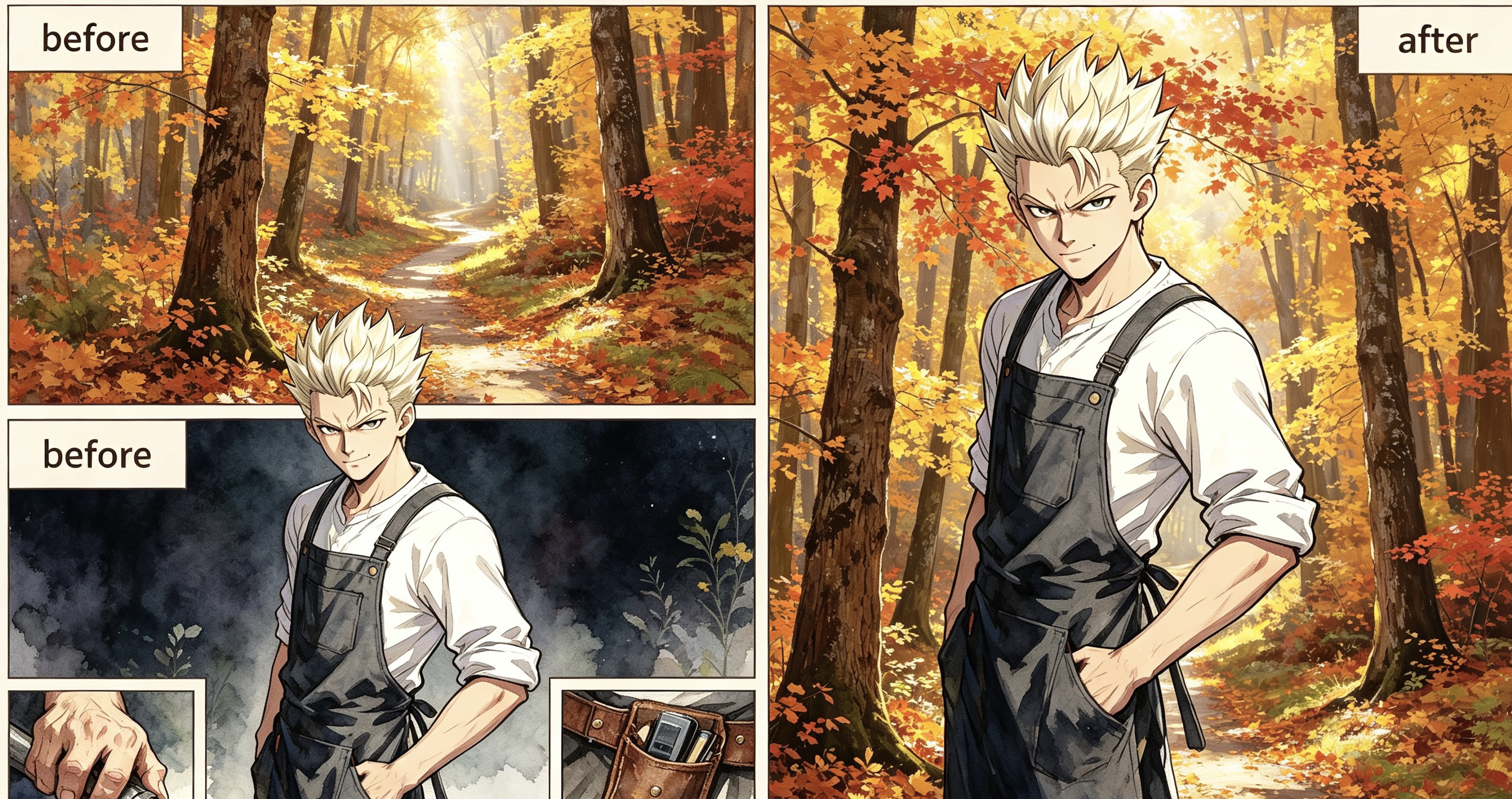
Sebelum Sesudah A narrow, winding dirt path disappears into a dense autumn forest during the gol
Pertahankan karakter
Sebelum Sesudah The blonde woman from the character still is seated on a plush, oversized living
Pertahankan karakter
Sebelum Sesudah
Cara menggunakan Latar karakter
- 1
Unggah gambar karakter
Unggah PNG atau JPG karakter yang digambar. Gambar ini menjadi acuan model untuk mencocokkan wajah, pose, dan pakaian.
- 2
Pilih mempertahankan atau menghapus karakter
Pilih apakah karakter tetap ada dalam gambar atau hanya latar kosong tanpa orang yang dibuat.
- 3
Pilih gaya serta model, lalu buat gambar
Buat prompt atau tulis sendiri, pilih gaya, model, dan rasio aspek, lalu tekan Buat untuk menghasilkan latar baru.
Apa itu Latar karakter?
The job
Standing portraits often sit on a blank fill. This page swaps the background while keeping the same cast and art style, so the scene can match the rest of your chapter.
How it works
- Upload a PNG or JPG still. This is the visual reference.
- Choose whether the result should keep characters or be an empty environment plate.
- Click Generate prompt (or write your own), pick art style, model, and image size, then generate.
- Logged-in users get a daily free quota; extra runs use credits.
Where it fits in the workflow
Use this tool when the character is already drawn and you only need the scene. For full pages, open the chapter in Create so the new background stays locked to the same cast and story.
Honest limits
AI still misses faces, outfits, and panel continuity. If the output drifts, regenerate or edit inside the chapter instead of stacking disconnected images.
Example: Before & After
Background prompt:
A young man with spiked platinum blonde hair wearing a purple and charcoal tactical jacket stands in the center of a dense autumn forest. The environment is filled with towering maple trees sporting vibrant orange, gold, and amber leaves that create a glowing canopy overhead. A narrow, winding dirt path disappears into the soft golden mist of the background, heavily carpeted in fallen red and yellow foliage. Bright, diffused afternoon sunlight pierces through the vertical tree trunks, creating long, soft shadows and shimmering highlights across the textured bark. The air is clear and still, emphasizing the rich, warm color palette of the woods. The man remains exactly as he appears, his confident pose unchanged amidst the vast scale of the sun-drenched, seasonal wilderness.
Tips for better results
- Name the location, time of day, weather, and a few landmark objects.
- If you keep characters, say so and keep the prompt focused on the environment.
- If you want an empty plate, the model is instructed not to draw people.
- 9:16 is the default vertical panel frame; switch to 16:9 for a wide establishing shot.
Why creators use it
This page is a free AI character-background tool that reuses the same styles and models as Tab Story portraits, so the scene can match the cast.
Pertanyaan umum
Apakah karakter tetap ada dalam gambar?
Ya, jika opsi “dengan karakter” diaktifkan. Model diarahkan untuk mempertahankan wajah, pose, dan pakaian serta hanya mengganti lingkungan. Nonaktifkan untuk membuat latar tanpa orang.
Gaya dan model apa yang bisa digunakan?
Gaya komik dan model gambar yang sama dengan alat gambar karakter, termasuk gaya sistem serta gaya khususmu.
Apakah gratis?
Setiap akun Tab Story yang masuk mendapat 20 pembuatan prompt dan 1 pembuatan gambar gratis per hari. Proses tambahan menggunakan 5 kredit per prompt dan 20 kredit per gambar.
Kapan sebaiknya menggunakan layar pembuatan?
Jika memerlukan halaman lengkap atau latar yang konsisten dengan karakter dan cerita, buka bab di layar pembuatan agar adegan baru tetap sesuai konteks.
Bagaimana jika hasilnya berbeda dari referensi?
AI bisa keliru pada wajah, pakaian, atau kesinambungan panel. Buat ulang atau edit di dalam bab, alih-alih menumpuk gambar yang tidak terhubung.
Bisakah digunakan untuk bidikan pembuka yang lebar?
Ya. Ubah rasio aspek ke 16:9 untuk bidikan lebar atau pertahankan 9:16 untuk panel vertikal.
Alat terkait
Panduan
Ingin latar yang konsisten dengan bab?
Buka bab di layar pembuatan agar adegan baru tetap terhubung dengan karakter dan cerita yang sama di setiap halaman.
Berkarya dengan Tab Story