활용 사례
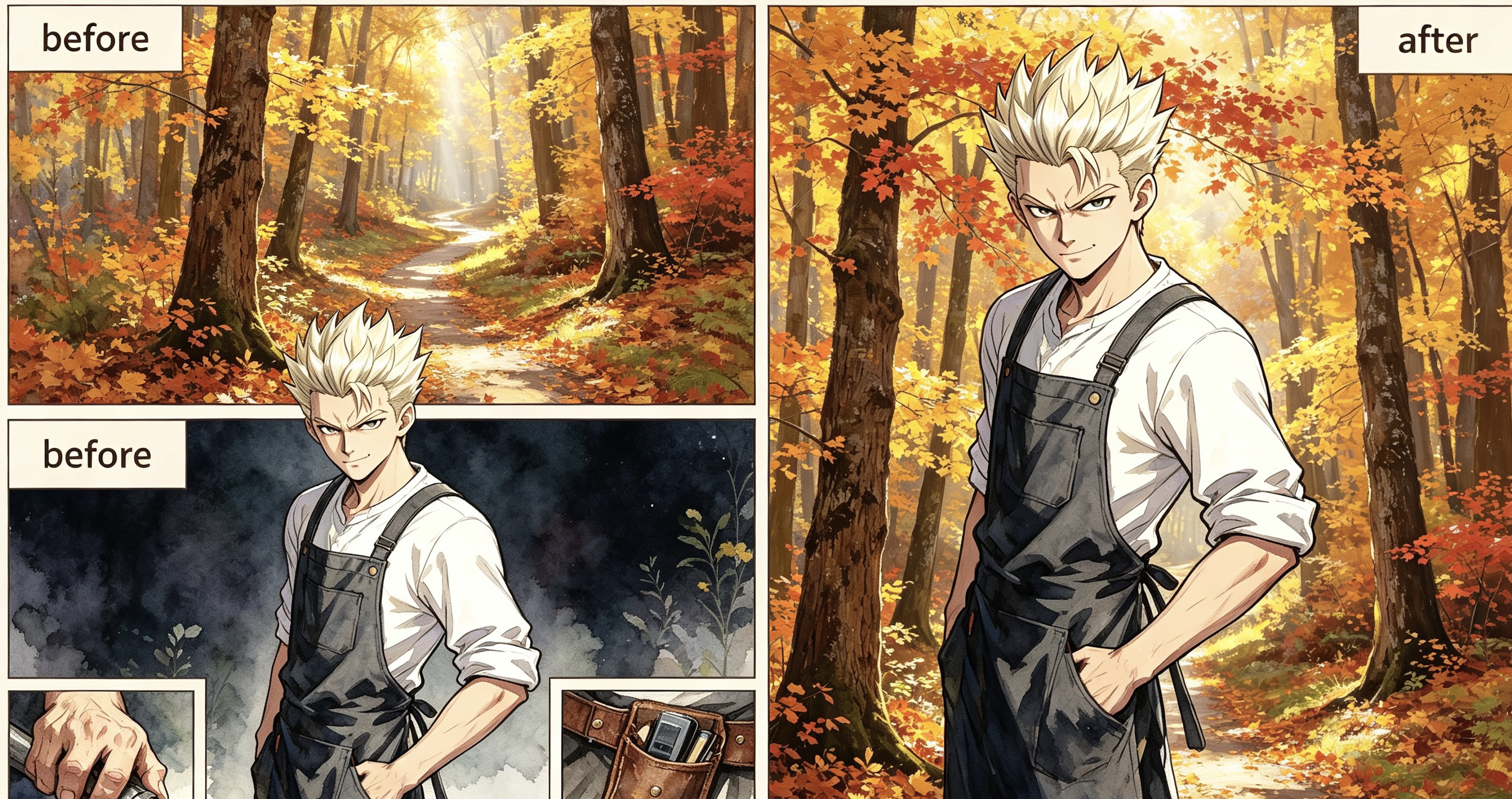
A young man with spiked platinum blonde hair wearing a purple and charcoal tacti
캐릭터 유지
편집 전 편집 후 A narrow, winding dirt path disappears into a dense autumn forest during the gol
캐릭터 유지
편집 전 편집 후 The blonde woman from the character still is seated on a plush, oversized living
캐릭터 유지
편집 전 편집 후
캐릭터 배경 사용 방법
- 1
캐릭터 이미지 업로드
그려진 캐릭터의 PNG 또는 JPG를 업로드하세요. 모델이 얼굴, 자세 및 의상을 맞추는 기준 이미지입니다.
- 2
캐릭터 유지 또는 제거 선택
캐릭터를 화면에 유지할지, 사람이 없는 배경만 생성할지 선택하세요.
- 3
스타일과 모델을 선택하고 생성
프롬프트를 생성하거나 직접 입력하고 스타일, 모델 및 화면 비율을 선택하세요. 생성 버튼을 눌러 새 배경을 만듭니다.
캐릭터 배경란 무엇인가요?
The job
Standing portraits often sit on a blank fill. This page swaps the background while keeping the same cast and art style, so the scene can match the rest of your chapter.
How it works
- Upload a PNG or JPG still. This is the visual reference.
- Choose whether the result should keep characters or be an empty environment plate.
- Click Generate prompt (or write your own), pick art style, model, and image size, then generate.
- Logged-in users get a daily free quota; extra runs use credits.
Where it fits in the workflow
Use this tool when the character is already drawn and you only need the scene. For full pages, open the chapter in Create so the new background stays locked to the same cast and story.
Honest limits
AI still misses faces, outfits, and panel continuity. If the output drifts, regenerate or edit inside the chapter instead of stacking disconnected images.
Example: Before & After
Background prompt:
A young man with spiked platinum blonde hair wearing a purple and charcoal tactical jacket stands in the center of a dense autumn forest. The environment is filled with towering maple trees sporting vibrant orange, gold, and amber leaves that create a glowing canopy overhead. A narrow, winding dirt path disappears into the soft golden mist of the background, heavily carpeted in fallen red and yellow foliage. Bright, diffused afternoon sunlight pierces through the vertical tree trunks, creating long, soft shadows and shimmering highlights across the textured bark. The air is clear and still, emphasizing the rich, warm color palette of the woods. The man remains exactly as he appears, his confident pose unchanged amidst the vast scale of the sun-drenched, seasonal wilderness.
Tips for better results
- Name the location, time of day, weather, and a few landmark objects.
- If you keep characters, say so and keep the prompt focused on the environment.
- If you want an empty plate, the model is instructed not to draw people.
- 9:16 is the default vertical panel frame; switch to 16:9 for a wide establishing shot.
Why creators use it
This page is a free AI character-background tool that reuses the same styles and models as Tab Story portraits, so the scene can match the cast.
자주 묻는 질문
캐릭터가 이미지에 남나요?
“캐릭터 포함”을 켜면 남습니다. 모델에는 얼굴, 자세 및 의상을 유지하고 배경만 교체하도록 지시합니다. 끄면 사람이 없는 배경을 생성합니다.
어떤 스타일과 모델을 사용할 수 있나요?
캐릭터 전신 이미지 도구와 같은 스타일 및 그림 모델을 사용할 수 있습니다. 시스템 스타일과 사용자 지정 스타일 모두 지원합니다.
무료인가요?
로그인한 Tab Story 계정은 하루에 프롬프트 생성 20회와 이미지 생성 1회를 무료로 이용할 수 있습니다. 추가 실행에는 프롬프트당 5크레딧, 이미지 생성당 20크레딧이 사용됩니다.
언제 제작 화면을 사용해야 하나요?
페이지 전체가 필요하거나 배경을 같은 등장인물과 이야기에 맞추려면 제작 화면에서 장을 여세요. 새 장면을 이야기의 맥락에 맞게 만들 수 있습니다.
참고 이미지와 결과가 달라지면 어떻게 하나요?
AI가 얼굴, 의상 또는 컷 간의 연속성을 놓칠 수 있습니다. 관련 없는 이미지를 계속 쌓기보다 장 안에서 다시 생성하거나 편집하세요.
넓은 도입 장면에도 사용할 수 있나요?
네. 넓은 구도는 화면 비율을 16:9로 바꾸고 세로 컷은 9:16을 유지하세요.
관련 도구
가이드
배경을 장과 일관되게 만들고 싶나요?
제작 화면에서 장을 열면 모든 페이지에서 같은 등장인물 및 이야기에 맞는 새 장면을 만들 수 있습니다.
Tab Story로 제작하기