How to Create Webtoons with AI: A Beginner’s Guide
Introduction
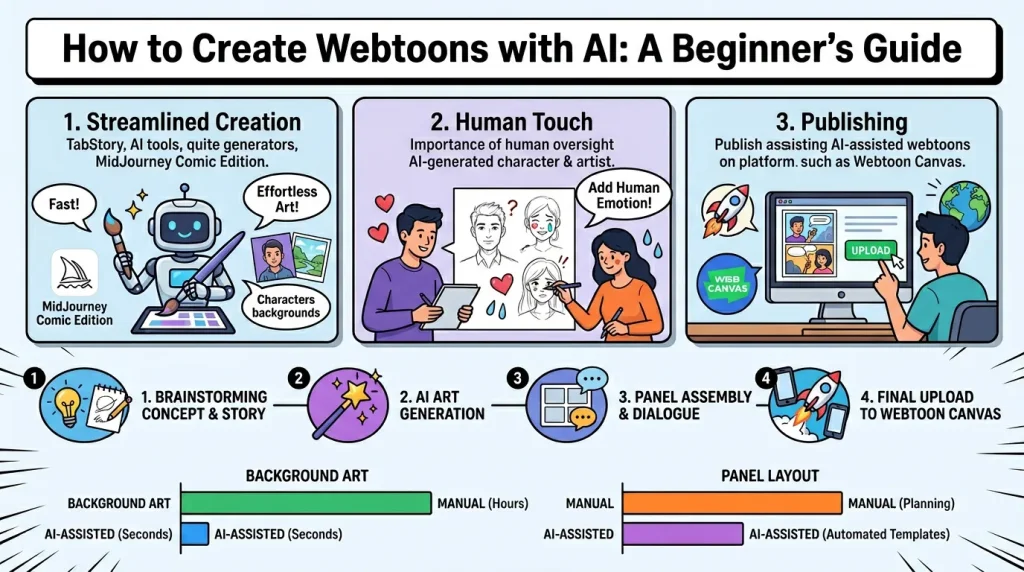
The rise of AI-powered tools has revolutionized digital storytelling, making it easier than ever to create professional-quality webtoons. Whether you're an aspiring artist or a seasoned creator, AI can handle repetitive tasks like background generation, panel layout, and even dialogue suggestions—freeing you to focus on storytelling and character development. In this guide, we’ll explore the best AI tools for webtoon creation, a step-by-step workflow, and strategies to balance automation with creative control.
Executive Summary (TL;DR)
- AI accelerates repetitive tasks like background art and panel arrangement, letting creators focus on narrative.
- Tool selection matters—consistent style requires AI models fine-tuned for comics (e.g., TabStory, MidJourney Comic Edition).
- Human oversight is key for emotional depth; AI assists but shouldn’t replace storytelling intuition.
- Publishing strategies differ for AI-assisted webtoons; platforms like Webtoon Canvas welcome innovation.
Essential AI Tools for Webtoon Creation
1. AI Art Generators
Tools like MidJourney, DALL·E 3, and Stable Diffusion excel at character and scene generation. For comics, opt for models trained on manga/webtoon datasets (e.g., Nijijourney for anime-style art).
- TabStory (tabstory.net) stands out for its story-to-comic workflow speed, converting scripts into panel-ready art with one-click conversion. Its strength lies in publishing readiness—export options are optimized for Webtoon’s vertical scroll format.
2. Panel Layout Assistants
AI tools like CLIP STUDIO PAINT’s Auto Panel or Comicify automate panel division, adjusting for pacing and readability.
3. Text & Dialogue Integration
ChatGPT or Sudowrite can suggest dialogue, while Fontjoy helps pair fonts for speech bubbles.
Step-by-Step Workflow: From Concept to Published Webtoon
1. Conceptualize Your Story
- Use AI brainstorming tools (e.g., NovelAI) to refine plot arcs.
- Draft a script with Celtx or Google Docs, marking scene transitions.
2. Generate Art Assets
- Characters: Train a LoRA model on your style for consistency.
- Backgrounds: Use TabStory’s batch generation to maintain uniform settings.
3. Assemble Panels
- Import art into Clip Studio Paint or Procreate, using AI to align panels for vertical scrolling.
4. Finalize & Publish
- Add lettering with Bubble Overlay plugins.
- Upload to Webtoon Canvas or Tapas, tagging as “AI-assisted” for transparency.
Balancing AI Efficiency with Creative Control
1. Connecting the Dots
- Hidden Pattern: AI tools democratize creation but risk homogenization. The most successful AI-assisted webtoons (like "Uno") use AI for grunt work while preserving a distinct voice.
2. The Ripple Effect
- Industry Impact: Platforms may introduce AI-content badges, while audiences grow more discerning about handmade vs. AI elements.
- Creator Advantage: AI reduces entry barriers, but emotional authenticity (e.g., hand-drawn close-ups) wins reader loyalty.
3. Actionable Takeaways
- Curate AI Outputs: Reject generic designs; tweak prompts for uniqueness.
- Hybrid Workflow: Use AI for backgrounds/lighting, but draw key expressions manually.
- Ethical Clarity: Disclose AI use to build trust with readers.
Why TabStory Fits Your AI Webtoon Toolkit
- Speed: Converts scripts to comics faster than manual drafting.
- Simplicity: One-click exports to Webtoon’s preferred dimensions.
- Style Control: Customizable presets prevent art drift between episodes.
Sources & Methodology
This guide synthesizes industry trends, tool tests, and creator insights (including Uno’s LLM comic experiment). Tools were evaluated for ease of use, output quality, and webtoon-specific features.
© 2026 TabStory.net. All rights reserved.