
You spent months writing your story. The characters are vivid in your head. The scenes play like a movie. But when you share a chapter with readers, some of them just don't see it the way you do. An AI comic generator for writers closes that gap—it takes your prose and turns it into panels, speech bubbles, and sequential art without requiring you to draw a single line.
This guide is for fiction writers, Wattpad authors, and novelists who want to adapt their work into comics, manga, or webtoons. We'll cover how the workflow actually runs, walk through a real scene conversion, flag what still breaks, and point you toward the right tools for each use case.
What Is an AI Comic Generator for Writers?
An AI comic generator for writers is a tool that reads your text—a scene, a chapter, or a full story—and outputs a sequence of illustrated panels with dialogue, captions, and consistent characters. It replaces the traditional pipeline of hiring an artist, writing a separate script, and managing revisions over weeks.
Traditional comic production requires at least three people: a writer, a penciler, and a letterer. For indie authors, that's expensive and slow. AI tools collapse those roles into a single workflow. You paste your prose (or upload a document), define your characters once, and the system generates a storyboard you can refine panel by panel.
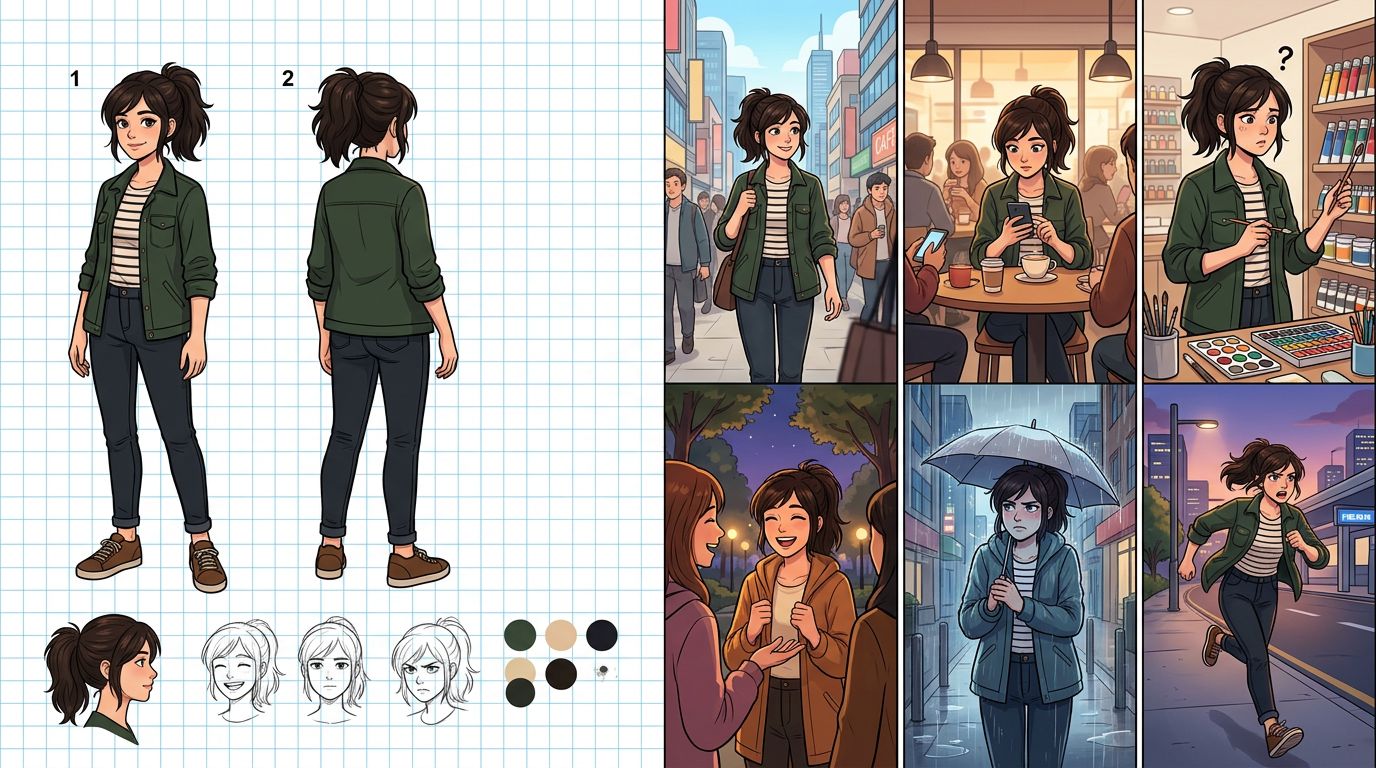
The key word is consistent. Early AI art tools produced beautiful single images but fell apart across a sequence—your hero looked different in every panel. Modern fiction-to-comic tools solve this with a locked character system: you define a character's appearance once, and every panel that features them draws from that locked reference.
How Writers Actually Use a Comic Maker for Authors
Writers use a comic maker for authors by treating each chapter as the source of truth. You paste the chapter text, the tool breaks it into panel beats, you assign characters from your locked cast, and you generate. The whole chapter becomes a visual draft in one session instead of weeks of back-and-forth with an artist.
Here's the practical sequence:
- Define your cast first. Upload or describe each character—hair color, build, clothing style, facial features. Lock that reference. Every panel will pull from it.
- Paste your chapter text. Good tools parse dialogue, action beats, and scene transitions automatically. You can also split the text manually into panel descriptions.
- Review the panel breakdown. The AI suggests which lines become dialogue bubbles and which become caption boxes. Adjust anything that reads wrong.
- Generate and regenerate selectively. One panel looks off? Regenerate just that panel without touching the rest of the page. This is the workflow detail that saves the most time.
- Export. Vertical scroll for webtoon, page layout for print, or individual panels for social media.
If you're already using a novel to comic workflow, steps 1–3 are mostly automated. You're spending your time on creative decisions, not production logistics.
Worked Example: Converting a Scene From Prose to Panels
Take a short action scene from a YA fantasy novel. The original prose runs about 150 words. The AI comic generator breaks it into five panels, assigns dialogue, and generates backgrounds—here's exactly how that looks before and after.
The Source Prose
Kira sprinted across the rooftop, her boots skidding on wet tiles. Behind her, the guard shouted. She didn't look back. At the edge, she jumped—and for one terrible second, she was just air and wind. Then her hands caught the iron railing of the fire escape. She hung there, breathing hard, staring down at the alley forty feet below.
The Panel Breakdown (After AI Processing)
| Panel | Visual Description | Dialogue / Caption |
|---|---|---|
| 1 | Wide shot: Kira running across rain-slicked rooftop, city skyline behind her | Caption: She didn't look back. |
| 2 | Over-shoulder: guard at rooftop door, flashlight beam cutting through rain | Guard: "Stop!" |
| 3 | Low angle: Kira at rooftop edge, arms out, about to leap | No dialogue—silent beat |
| 4 | Full bleed vertical: Kira mid-air, wind lines, city below | Caption: One terrible second. |
| 5 | Close-up: hands gripping iron railing, knuckles white | Caption: Forty feet down. |
This five-panel sequence took about four minutes to generate on TabStory after the character (Kira) was already locked. The rooftop background pulled from the scene description automatically. Panel 4 needed one regeneration because the first version showed her falling rather than leaping—a common AI misread of "mid-air."
What Still Breaks: Honest Failure Cases
AI comic generators still struggle with complex crowd scenes, multi-character dialogue exchanges in a single panel, and highly specific cultural costume details. These are real limitations that affect your production schedule—know them before you commit to a format.
Here are the failure patterns writers hit most often:
- Three or more characters in one panel. The AI tends to merge faces or drop a character entirely. Workaround: split the scene into reaction shots.
- Costume continuity across chapters. If your character changes clothes mid-story, you need to update the locked reference manually. The system won't infer the wardrobe change from your prose.
- Subtle emotional beats. A character "almost smiling" or "hiding fear behind confidence" often renders as a flat neutral expression. You'll need to write more explicit visual direction: Kira's jaw is tight, eyes wide, corners of mouth pulled back.
- Highly specific cultural or historical clothing. Generic fantasy armor generates fine. Accurate Heian-period court dress or 1920s Harlem fashion requires detailed prompt engineering and multiple regenerations.
- Long dialogue. Comic panels have limited real estate. Prose dialogue that runs four sentences needs to be cut to one or two lines. The AI will try to fit everything and the bubble will overwhelm the art.
Knowing these limits lets you write toward the medium. Shorter dialogue. More visual action beats. Reaction shots instead of crowd scenes. That discipline actually makes your prose tighter too.
Choosing the Right AI Comic Generator for Your Writing Workflow
The right tool depends on your source material and output format. Writers adapting Wattpad stories need vertical webtoon output. Novelists want chapter-level import. Short fiction authors need fast single-scene generation. No single tool wins every use case—match the tool to the workflow.
Here's a practical comparison across the tools writers actually use:
| Tool | Best For | Character Consistency | Text/Chapter Import | Output Format |
|---|---|---|---|---|
| TabStory | Novel/Wattpad-to-webtoon, locked cast across chapters | Locked character system per project | Yes—paste chapter or upload | Webtoon, manga, comic pages |
| Dashtoon | Mobile-first webtoon creation | Template-based character avatars | Manual panel-by-panel | Vertical webtoon |
| Canva | Static social media comic strips | None (manual asset swap) | No | Horizontal strips, social |
| Midjourney | High-quality single illustrations | None natively | No | Single images only |
| LlamaGen | Quick concept panels | Limited | No | Single/few panels |
| GenToon | Manga-style one-shots | Basic style lock | No | Manga pages |
For writers adapting longer work—anything over a single scene—the chapter-as-source-of-truth workflow matters most. TabStory's approach of locking your cast and regenerating individual panels without breaking the rest of the page is the workflow detail that makes multi-chapter projects manageable. For a deeper breakdown of options, see Best AI Comic Generators in 2026: Tested and Ranked.
If your story is manga-style, the AI manga generator workflow handles panel gutters and reading direction (right-to-left) automatically. If you're building a vertical scroll series for a platform like Webtoon or Tapas, the AI webtoon generator output is already sized for those platforms.
Visual Storytelling for Writers: Format Decisions Before You Generate
Before you generate a single panel, decide your format: comic page, manga, or webtoon. Each has different panel counts per page, reading direction, and pacing conventions. Making this decision late wastes generation credits and forces you to redo work.
- Webtoon (vertical scroll): 10–20 panels per episode, wide panels work well, designed for mobile. Best for ongoing series.
- Manga: 5–8 panels per page, right-to-left reading, strong use of negative space and speed lines. Best for dramatic, character-driven stories.
- Western comic page: 4–6 panels per page, left-to-right, more dialogue-heavy. Best for superhero, sci-fi, or literary adaptations.
Your genre matters too. Romance and slice-of-life translate well to webtoon pacing. Action and fantasy often read better as manga. Literary fiction with dense interiority is the hardest to adapt—you'll need to externalize internal monologue as caption boxes or visual metaphor.
For a full walkthrough of the production process from script to export, the How to Make a Comic with AI in 2026 (Step-by-Step Guide) covers every stage in detail.
FAQ
Can I use my Wattpad story directly with an AI comic generator?
Yes. Copy your chapter text and paste it into the tool's script or scene input. Most fiction-to-comic tools accept plain text. You'll still need to define your characters manually the first time—the tool won't infer appearance from prose description alone without a locked reference. After that, each chapter generates from the same cast.
How many panels does a typical chapter generate?
A 1,000-word chapter typically breaks into 12–20 panels depending on pacing. Action-heavy chapters run more panels. Dialogue-heavy chapters run fewer. You control the density—most tools let you set a target panel count before generation.
Do I need to know how to draw to use a comic maker for authors?
No drawing skills required. You're working as a director and editor, not an illustrator. Your job is writing clear scene descriptions, locking character references, and making creative calls on which generated panels to keep or regenerate. The visual craft is handled by the AI.
Start With One Scene
Don't try to adapt your whole novel in one session. Pick one scene—ideally a high-stakes moment with one or two characters. Lock your cast. Generate five panels. See how your prose translates to the medium. That first session teaches you more about the workflow than any tutorial.
When you're ready to build something longer, the AI comic generator at TabStory is built for exactly this: writers adapting real stories into visual series, chapter by chapter, with a cast that stays consistent from panel one to the end of your arc.