Use cases
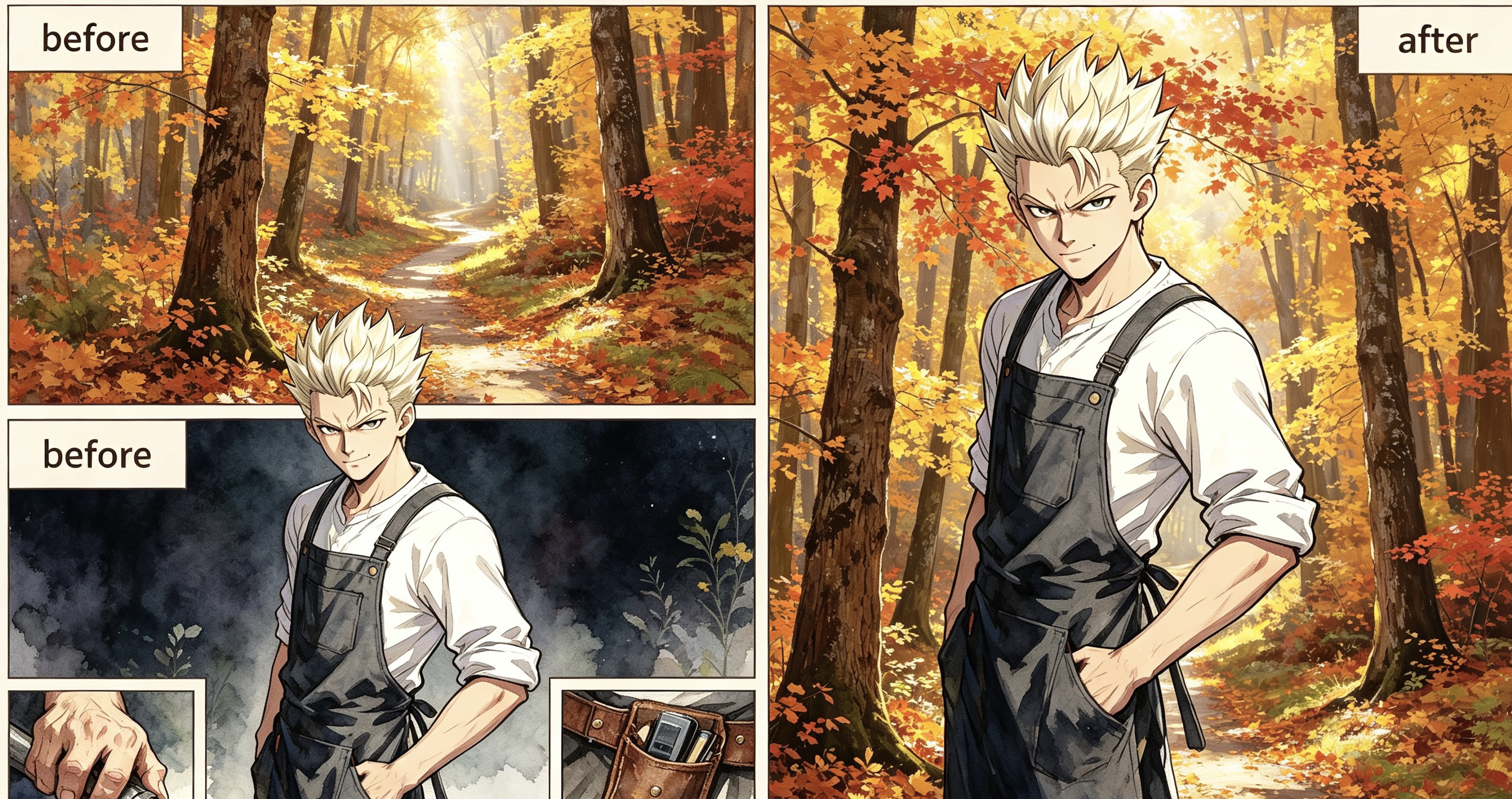
A young man with spiked platinum blonde hair wearing a purple and charcoal tacti
Keep characters
Before After A narrow, winding dirt path disappears into a dense autumn forest during the gol
Keep characters
Before After The blonde woman from the character still is seated on a plush, oversized living
Keep characters
Before After
How to use Character Background
- 1
Upload your character still
Drop in a PNG or JPG of the drawn character. This image is the visual reference the model uses to match face, pose, and outfit.
- 2
Choose keep or clear
Toggle whether the result should keep the characters in frame or produce an empty environment plate with no people.
- 3
Set style, model, and generate
Generate a prompt or write your own, pick an art style and model, choose your aspect ratio, then hit Generate to produce the new background.
What is Character Background?
The job
Standing portraits often sit on a blank fill. This page swaps the background while keeping the same cast and art style, so the scene can match the rest of your chapter.
How it works
- Upload a PNG or JPG still. This is the visual reference.
- Choose whether the result should keep characters or be an empty environment plate.
- Click Generate prompt (or write your own), pick art style, model, and image size, then generate.
- Logged-in users get a daily free quota; extra runs use credits.
Where it fits in the workflow
Use this tool when the character is already drawn and you only need the scene. For full pages, open the chapter in Create so the new background stays locked to the same cast and story.
Honest limits
AI still misses faces, outfits, and panel continuity. If the output drifts, regenerate or edit inside the chapter instead of stacking disconnected images.
Example: Before & After
Background prompt:
A young man with spiked platinum blonde hair wearing a purple and charcoal tactical jacket stands in the center of a dense autumn forest. The environment is filled with towering maple trees sporting vibrant orange, gold, and amber leaves that create a glowing canopy overhead. A narrow, winding dirt path disappears into the soft golden mist of the background, heavily carpeted in fallen red and yellow foliage. Bright, diffused afternoon sunlight pierces through the vertical tree trunks, creating long, soft shadows and shimmering highlights across the textured bark. The air is clear and still, emphasizing the rich, warm color palette of the woods. The man remains exactly as he appears, his confident pose unchanged amidst the vast scale of the sun-drenched, seasonal wilderness.
Tips for better results
- Name the location, time of day, weather, and a few landmark objects.
- If you keep characters, say so and keep the prompt focused on the environment.
- If you want an empty plate, the model is instructed not to draw people.
- 9:16 is the default vertical panel frame; switch to 16:9 for a wide establishing shot.
Why creators use it
This page is a free AI character-background tool that reuses the same styles and models as Tab Story portraits, so the scene can match the cast.
FAQ
Will the character stay in the picture?
Yes, if you turn on “has characters.” The model is told to keep face, pose, and outfit and only replace the environment. Turn it off for an empty scene plate.
Which styles and models can I use?
The same comic styles and drawing models as the character portrait tool, including system styles and your custom styles.
Is it free?
Each signed-in Tab Story account gets 20 free prompt runs and 1 free generate per day. Extra runs use credits: 5 credits per prompt, 20 credits per generate.
When should I use Create instead?
If you need a full page or want the background to stay locked to the same cast and story, open the chapter in Create so the new scene stays in context.
What if the output drifts from the reference?
AI can miss faces, outfits, or panel continuity. Regenerate or edit inside the chapter instead of stacking disconnected images.
Can I use this for wide establishing shots?
Yes. Switch the aspect ratio to 16:9 for a wide shot, or keep 9:16 for a vertical panel frame.
Related tools
Guides
Need the background locked to your chapter?
Open your chapter in Create so the new scene stays tied to the same cast and story across every page.
Create with Tab Story