Using an anime character generator used to mean rolling a random trait table or spending hours in a character creator with sliders. In 2026, AI flips that workflow: you describe your original character (OC), the model renders them, and you lock that design for every panel in your story. The gap between "I have an idea" and "I have a usable character sheet" is now measured in minutes, not days. This guide walks through how these tools actually work, where they shine, and where they still break.
What Is an Anime Character Generator and How Does It Work?
An anime character generator is a tool—AI-powered or template-based—that produces original anime-style character art from text prompts, reference images, or trait selections. Modern AI versions use diffusion models fine-tuned on anime datasets to render consistent character designs you can reuse across scenes.
At the basic end, you get random generators that spit out trait combinations: hair color, eye shape, personality archetype. These are fun for brainstorming but produce no actual art.
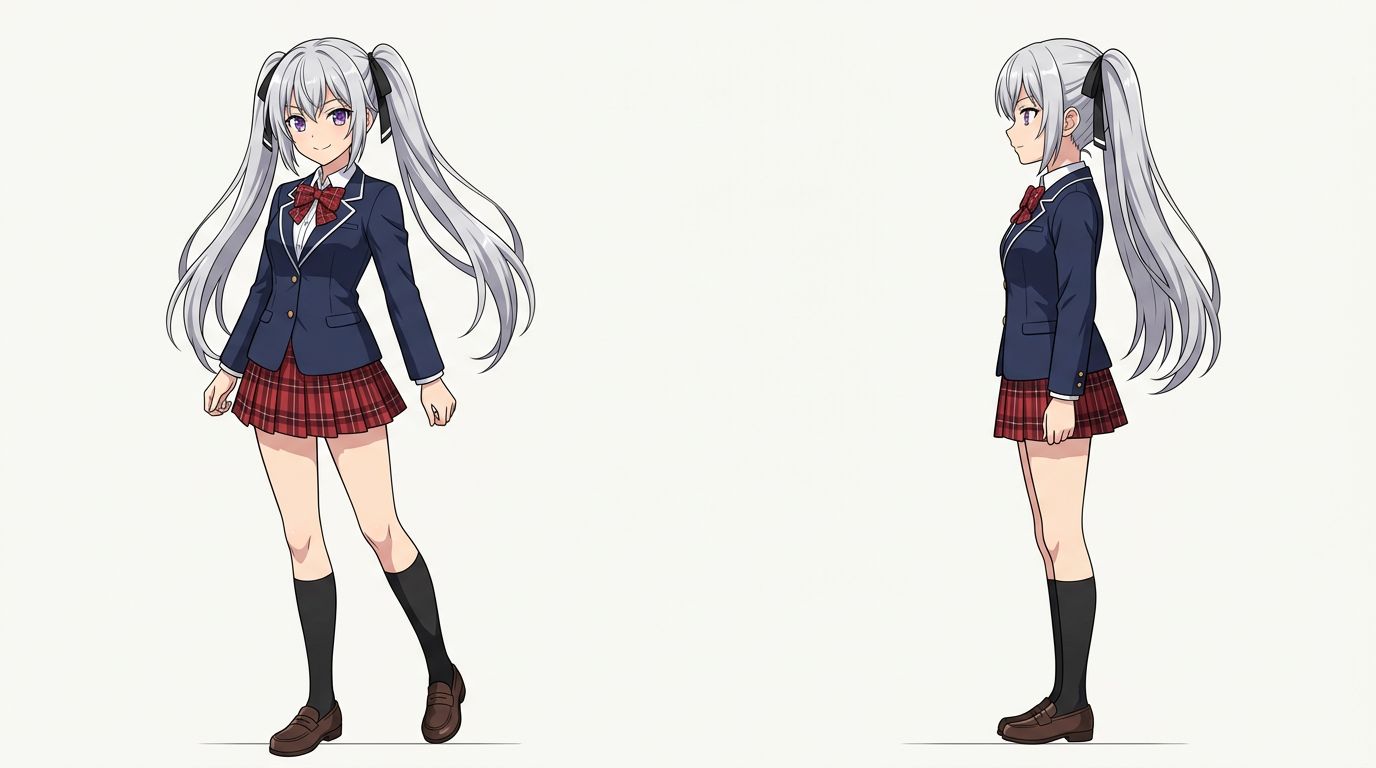
At the AI end, tools like TabStory's AI character generator let you write a character description—"17-year-old girl, silver twin-tails, violet eyes, school uniform with a torn sleeve"—and generate a character sheet you can lock to a project. Every panel that features that character pulls from the same locked reference, so her face doesn't drift between chapter one and chapter five.
The core technical challenge is identity preservation. Standard image generators are stateless—they don't remember your character between prompts. Purpose-built comic tools solve this with a character embedding or a reference image that gets injected into every generation call.
How to Design a Custom Anime Character with AI
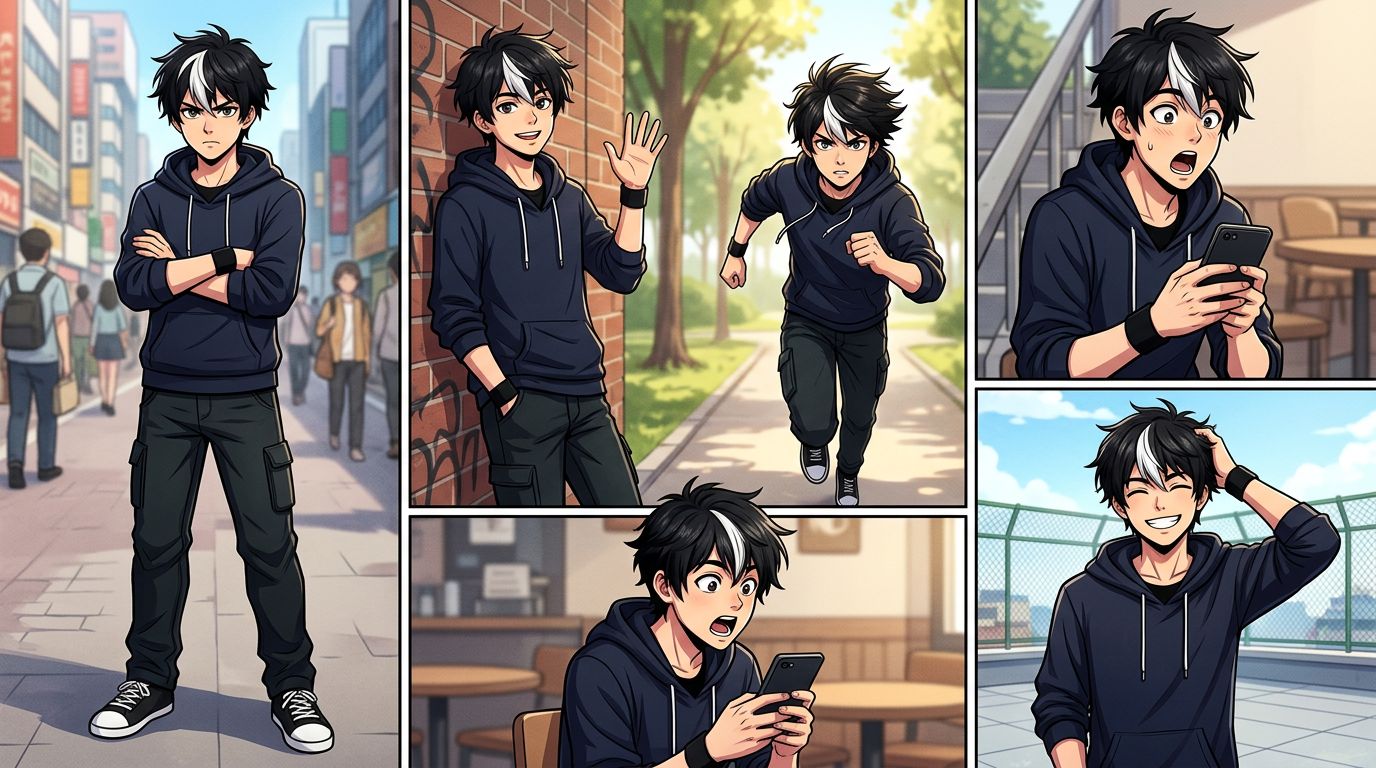
To design a custom anime character with AI, write a precise character description covering physical traits, outfit, and mood, then generate a base design and lock it as a reference. From there, every scene prompt inherits that locked identity so your character looks the same panel after panel.
Here's a practical workflow:
Step 1 — Write a Character Bible Entry
Before you touch any generator, write 3–5 sentences. Cover:
- Age range and gender presentation
- Distinctive physical features (hair, eyes, any marks)
- Signature outfit with specific details
- Emotional default (stoic, energetic, nervous)
Example: "Ren is a 16-year-old boy with messy black hair, a single white streak above his left ear, sharp amber eyes, and a dark green hoodie with a broken zipper. He carries a battered sketchbook. His default expression is focused, slightly skeptical."
Step 2 — Generate and Iterate
Paste that description into your AI anime character creator. Generate 4–6 variants. Pick the one closest to your mental image. Don't chase perfection on the first pass—you're establishing a reference anchor, not final art.
Step 3 — Lock the Character
In TabStory, you save this design as a named character in your project. The platform stores the visual embedding. When you write a panel that includes Ren, you tag him by name and the generator pulls his locked appearance automatically.
Step 4 — Test Across Expressions and Angles
Generate Ren smiling, angry, and in profile. If the identity holds across those three tests, your character is ready for production. If the white streak disappears or his eye color shifts, refine the description and regenerate the base.
Worked Example: A Three-Panel Scene
Script:
- Panel 1: Ren stands at a school gate, looking up at rain clouds. Wide shot.
- Panel 2: Close-up on his amber eyes, skeptical expression.
- Panel 3: He opens his sketchbook, a small determined smile.
With a locked character, all three panels render with consistent hair, the white streak, and the green hoodie—even though the framing changes dramatically between a wide shot and a close-up. Without a locked reference, the close-up in panel 2 would likely drift: different nose shape, slightly wrong eye color.
For a deeper look at keeping characters on-model across an entire chapter, read How to Create Consistent Comic Characters with AI.
Anime Character Design AI: What to Look for in a Tool
The most important feature in any anime character design AI is identity persistence—the ability to reuse the same character across multiple panels without manual re-prompting. Secondary features include style control (shonen, shojo, chibi), expression range, and direct integration with a panel layout tool.
Here's what separates tools built for storytelling from tools built for one-off art:
| Feature | One-off art generators | Story-focused tools (e.g., TabStory) |
|---|---|---|
| Character locking | No | Yes — saved per project |
| Multi-panel consistency | Manual re-prompting | Automatic via character reference |
| Script-to-panel workflow | No | Yes — paste script, get panels |
| Style presets (shonen, shojo) | Sometimes | Yes |
| Regenerate single panel | No | Yes — without breaking other panels |
| Novel/text as source | No | Yes |
If you're building a one-page illustration or an avatar, a general AI art tool works fine. If you're building a chapter—or adapting a Wattpad story or novel into a webtoon—you need the locked-cast workflow. See How to Turn a Novel Into a Webtoon: The Complete Adaptation Guide for how that pipeline works end to end.
Anime OC Maker vs. Full Comic Workflow: Which Do You Need?
An anime OC maker is the right tool when you need a character design for a profile, avatar, or pitch. A full comic workflow tool is what you need when that character has to appear in 50+ panels across multiple chapters without drifting in appearance.
Most creators start with an OC maker and hit a wall when they try to produce sequential art. The character looks great in isolation. Then panel three has a slightly different nose. Panel seven has the wrong hair color. You spend more time fixing drift than writing story.
The fix is choosing a tool where character design and panel generation are the same system. TabStory's AI comic generator treats your character sheet as a first-class project asset, not a prompt you have to paste every time.
If your story is manga-format (right-to-left, black-and-white panels), the same locked-character logic applies through the AI manga generator. For vertical scroll webtoon format, the AI webtoon generator handles the panel stacking automatically.
Where Anime Character Generators Still Break
Current AI anime character generators struggle most with accessories, hands, and multi-character scenes. Small distinctive details—a specific earring, a prosthetic arm, a logo on a jacket—often disappear or distort across panels, even with a locked reference.
Here are the specific failure cases you'll hit:
Accessories drift. A character with a distinctive necklace or glasses will lose them in roughly 1 in 5 panels, especially in close-ups where the framing cuts off the usual anchor points.
Hands. Still the hardest thing for diffusion models. Action panels where a character is holding something—a sword, a phone, a sketchbook—produce the most errors. Plan for manual touch-up on hand-heavy panels.
Two characters in the same panel. When two locked characters share a frame, the model sometimes blends their features. Character A might get Character B's eye color. This is the biggest unsolved problem in AI comic generation as of 2026.
Extreme angles. A dramatic low-angle shot looking up at a character's face will often break the locked identity more than a standard three-quarter view. Stick to conventional angles for critical character-reveal moments.
Workaround: For panels where accuracy matters most—a first appearance, an emotional climax—generate 3–4 variants and pick the most on-model one. Build that selection step into your production schedule.
FAQ
Can I use an anime character generator to make a full comic?
Yes, but only if the tool supports character locking across panels. A standalone character generator produces a single image. A comic-focused platform like TabStory connects that character design to a panel generation system, so the same character appears consistently across an entire chapter.
How do I keep my anime OC looking the same in every panel?
Write a detailed character description, generate a base design, and lock it as a named character in your project. Every panel prompt that tags that character name pulls the locked reference automatically. The more specific your description—exact hair color, distinctive features, outfit details—the more stable the identity across panels.
What's the difference between an AI anime character creator and a random anime generator?
A random anime generator produces trait combinations or generic art with no identity persistence. An AI anime character creator lets you define a specific OC and reuse that design. For storytelling, you need the latter—random generators are useful for brainstorming archetypes, not for building a cast you'll draw for 20 chapters.
Start Building Your Cast
You have the workflow. Write your character bible entry, generate a base design, lock it, and test it across three expressions. If it holds, you're ready to script panels.
TabStory's AI character generator is where that process starts. Create your first OC, lock the design, and take it straight into a chapter—no separate tools, no re-prompting every panel.
For the full step-by-step from blank page to finished comic, How to Make a Comic with AI in 2026 (Step-by-Step Guide) covers the complete pipeline.